
How to Connect your Dayton Freight LTL Integration
EZ Loader TMS supports the following API functionalities with supported LTL providers:
- Rating (Submitting a Rate (aka Quote) request and receiving a Rate Response)
- Dispatching (Submitting a Dispatch (aka Pickup) request and receiving a confirmation response)
- Tracking (Requesting a Load Tracking update after the shipment has been picked up by the Carrier and receiving a tracking update)
-
Information You'll Need to Connect the Integration
- Dayton Login
- Dayton Password
- Dayton Account #
- Follow the steps below to obtain your required Integration information:
-
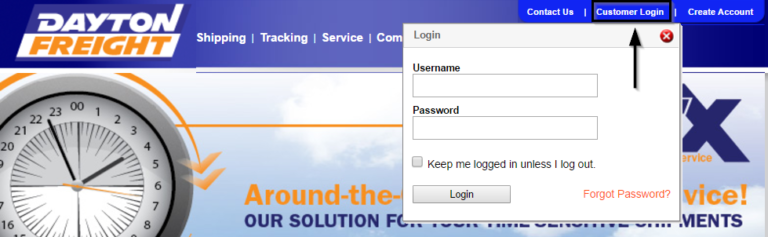
Visit Dayton Freight's website at http://daytonfreight.com and log in by selecting Customer Login on the top right of the page
- Select My Account on the top right of the page

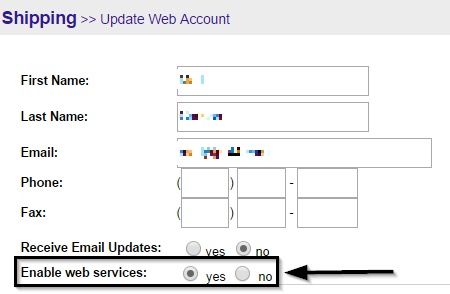
- Click on the Update Web Account Information link

-
Ensure the Enable Web Services option is set to Yes
- Contact Dayton Freight Customer Service at (800) 860-5102 or customerservice@daytonfreight.com to ensure the website user is associated with the account number you want to enter into your integration credentials window within EZ Loader.
How to Connect within EZ Loader TMS:
- Check to confirm the Carrier Profile of the LTL Carrier you want to integrate is added as a Carrier within your EZ Loader account.
- To add the Carrier > click +Add New at the top right of your EZ Loader account > New Carrier
- In the New Carrier window, add the basic Carrier information. Click the blue Save button to save the Carrier profile
- Connect the Integration by following the steps below:
- An Admin User group permission is required
- Navigate to your initials at top right > click Settings
- Click Integrations
- Click LTL Integrations to reveal a drop-down menu
- In the drop-down menu, select Available LTL Integrations
- Select the LTL Carrier API you wish to connect
- Type in the credentials as seen in the screenshot below and click Next.

- After clicking the Next button, read the LTL Portal Integration Acknowledgment fully and click Agree & Save.

- Contact your EZ Loader TMS Account Manager or Support Team if you have any questions and we're happy to help!