
Integrations - MyCarrierPortal
The MyCarrierPortal integration supports Carrier Onboarding and Monitoring. Please contact your EZ Loader Support Team at support@ezloadertms.com for assistance in the activation of this Integration.
Data Point Categories
The data points provided through the MyCarrierPortal integration fall into 2 categories:
- Static: Data points provided only during an "onboarding event" that do not update after the initial receipt of the onboarding dataset from MyCarrierPortal. We will refer to this information as static data points.
- Dynamic: Data points that are continuously updated through "change alerts". Information from change alerts will update/replace the previous data within EZ Loader. We will refer to this information as dynamic data points.
Static Data Points
These following data points are only received during an onboarding event and do not update after the initial receipt of the onboarding dataset from MyCarrierPortal.
- Carrier Info
- Carrier Name
- Physical Address
- Primary Contact
- MC#
- DOT#
- EIN# or SS# (If EIN is available, we will input that first, if not available we look for SS#) maps to the Federal ID # in EZL.
- Note: If MyCarrierPortal provides an EIN#, EZ Loader will also enter the physical address in the W9 fields. MyCarrierPortal does not provide designated W9 address information.
- Payee Information
- W9 Contact Information
- W9 Document
- Broker Agreement Document
Dynamic Data Points
These data points will update and replace the current information in EZ Loader whenever MyCarrierPortal sends a change alert.
- Carrier Status
- EZ Loader will only change a carrier status to "Active." If a user has manually changed the carrier status to anything other than "Active" (ex. Inactive) the status will not change regardless of the status provided from MyCarrierPortal.
- Insurance
- General Liability
- Auto Liability
- Cargo Liability
- Workers Compensation
- COI Documents
- Total Power Units
- Risk Assessment
- EZ Loader's "Risk Assessment" values are mapped to MyCarrierPortal's "Risk Assessment" values. See mapping index below:
- Acceptable (MCP) > Acceptable (EZL)
- Moderate (MCP) > Moderate (EZL)
- Unacceptable Review (MCP) > Moderate (EZL)
- Unacceptable Fail (MCP) > Unacceptable (EZL)
- Unacceptable (MCP) > Unacceptable (EZL)
- EZ Loader's "Risk Assessment" values are mapped to MyCarrierPortal's "Risk Assessment" values. See mapping index below:
Onboarding Carriers
Note: Once the MyCarrierPortal integration is activated, it is essential for users to initiate all initial onboardings directly in MyCarrierPortal rather than within EZ Loader. Failure to first onboard the carrier in MyCarrierPortal may result in incomplete Carrier profile data within EZ Loader.
- Once a carrier is onboarded within MyCarrierPortal, EZ Loader will receive an onboarding event and import the Carrier profile with the above mentioned data points within 5-6 minutes..
- In a situation where a Carrier profile already exists within EZ Loader but is not yet onboarded in MyCarrierPortal, upon completion of the MyCarrierPortal onboarding packet, the carrier profile in EZ Loader will only update the "Dynamic" data points.
- If an already existing carrier in EZ Loader needs to update both the Static and Dynamic data points through an onboarding event, the status of the carrier profile must be changed within EZ Loader to "Onboarding Sent" status. This is the only Carrier status within EZ Loader that will allow the system to "look" for an onboarding event from MyCarrierPortal.
- NOTE: It is not advised to receive an onboarding event for an already existing profile in EZ Loader. This action will overwrite any previously recorded data such as Carrier Payee information or contact info. The profile will update to any new information provided by MyCarrierPortal.
- If an already existing carrier in EZ Loader needs to update both the Static and Dynamic data points through an onboarding event, the status of the carrier profile must be changed within EZ Loader to "Onboarding Sent" status. This is the only Carrier status within EZ Loader that will allow the system to "look" for an onboarding event from MyCarrierPortal.
Manual Syncing
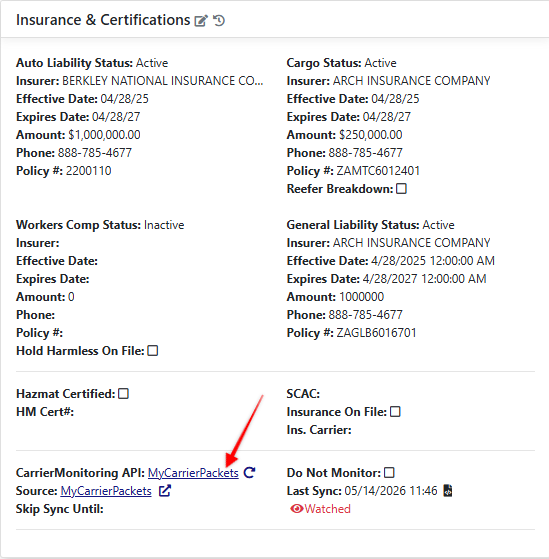
Within a Carrier profile you can trigger a manual sync of Dynamic data points. This may be useful for already existing EZ Loader Carrier profiles when you first activate the integration.
Quick Access to MyCarrierPortal Carrier Profile
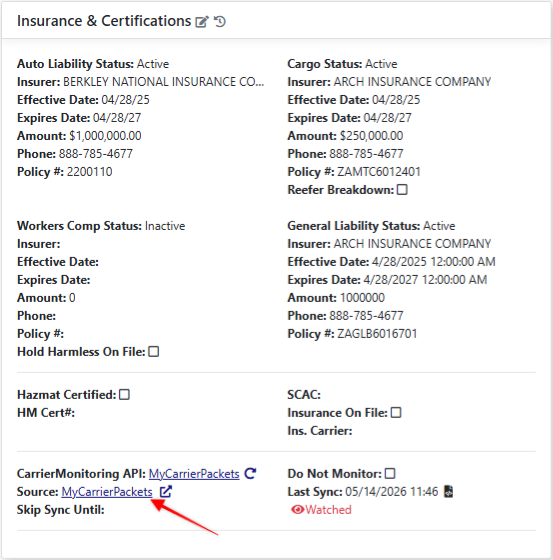
We have included convenient links that allow you to quickly access the MyCarrierPortal carrier profile, enabling you to view comprehensive Carrier information directly within the MyCarrierPortal platform. You will find these links in the carrier profile as well as the Carrier assignment window viewed when assigning a Carrier to a Load.
Overriding a MyCarrierPortal Assessment
In certain situations, it may be necessary to override a MyCarrierPortal assessment for a Carrier. It is important to approach this process with caution.
Users who possess Admin or Override permissions can enable the "Do not Monitor" checkbox located within the Insurance & Certifications section of the Carrier profile. By selecting this option, the system will cease to automatically update the Carrier's information from MyCarrierPortal. This functionality allows the user to manually modify the Carrier's Status or Risk Assessment values as needed.

Note: If you remove the "Do Not Monitor" checkbox, you need to select the manual refresh icon to pull in the latest information.