
How to Connect your ABF (ArcBest) LTL Integration
EZ Loader TMS supports the following API functionalities with supported LTL providers:
- Rating (Submitting a Rate (aka Quote) request and receiving a Rate Response)
- Dispatching (Submitting a Dispatch (aka Pickup) request and receiving a confirmation response)
- Tracking (Requesting a Load Tracking update after the shipment has been picked up by the Carrier and receiving a tracking update)
-
Information You’ll Need to Connect the Integration
- ABF Website User ID
- ABF Website User Password
-
What ABF Freight API Details Are Required
- API Secure ID
- Account Number
-
Instructions for Finding ABF Freight API Details
- Visit the ABF website at https://arcb.com/ and sign in on the top right corner of the page.

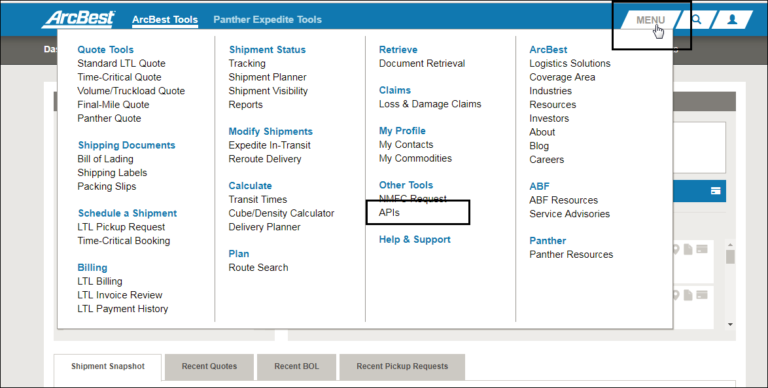
- Select API from the Menu option in the top right corner.
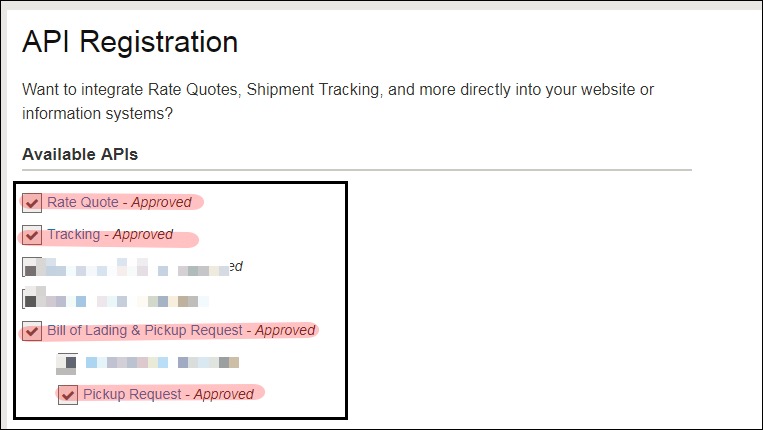
- Select all available API options. Check each API box and then click Submit. You will see Approved after each API.
- Record the ABF secure ID.
-
Locating API Key After It’s Already Been Requested
- If you’ve already registered for the API, but need to find the key again, click on ‘Rate Quote’

- Your key will be located in the sample request.

If you ever need your ABF account number, you can also email websupport@arcb.com to request your account number.
How to Connect within EZ Loader TMS:
- Check to confirm the Carrier Profile of the LTL Carrier you want to integrate is added as a Carrier within your EZ Loader account.
- To add the Carrier > click +Add New at the top right of your EZ Loader account > New Carrier
- In the New Carrier window, add the basic Carrier information. Click the blue Save button to save the Carrier profile
- Connect the Integration by following the steps below:
- An Admin User group permission is required
- Navigate to your initials at top right > click Settings
- Click Integrations
- Click LTL Integrations to reveal a drop-down menu
- In the drop-down menu, select Available LTL Integrations
- Select the LTL Carrier API you wish to connect
- Type in the credentials as seen in the screenshot below and click Next.

- After clicking the Next button, read the LTL Portal Integration Acknowledgment fully and click Agree & Save.

- Contact your EZ Loader TMS Account Manager or Support Team if you have any questions and we're happy to help!